Appearance
Libraries and Metadata
OmniLux turns the folders you choose into a browsable household library while keeping source media separate from its own application data.
Private beta
Mount source media read-only. OmniLux may scan and play those files, but it does not rename or move them during the private beta.
Supported library types
The OmniLux library model covers these household media types. The approved release notice defines which types are enabled in a particular beta release.
| Type | Metadata source | Common file formats |
|---|---|---|
| Movies | TMDB | MKV, MP4, AVI, WMV, MOV |
| TV shows | TMDB, TVDB | MKV, MP4, AVI, WMV, MOV |
| Music | MusicBrainz | FLAC, MP3, AAC, OGG, OPUS, WAV |
| Books | Open Library | EPUB, PDF, MOBI, AZW3 |
| Audiobooks | Audnexus | M4B, MP3, FLAC, OGG |
| Comics | ComicVine | CBZ, CBR, PDF |
Add a library root
A library root is a top-level folder OmniLux is allowed to scan.
- Open Settings > Library.
- Choose Add Library Root.
- Select the read-only path, media type, and display name.
- Save the root and begin the scan.
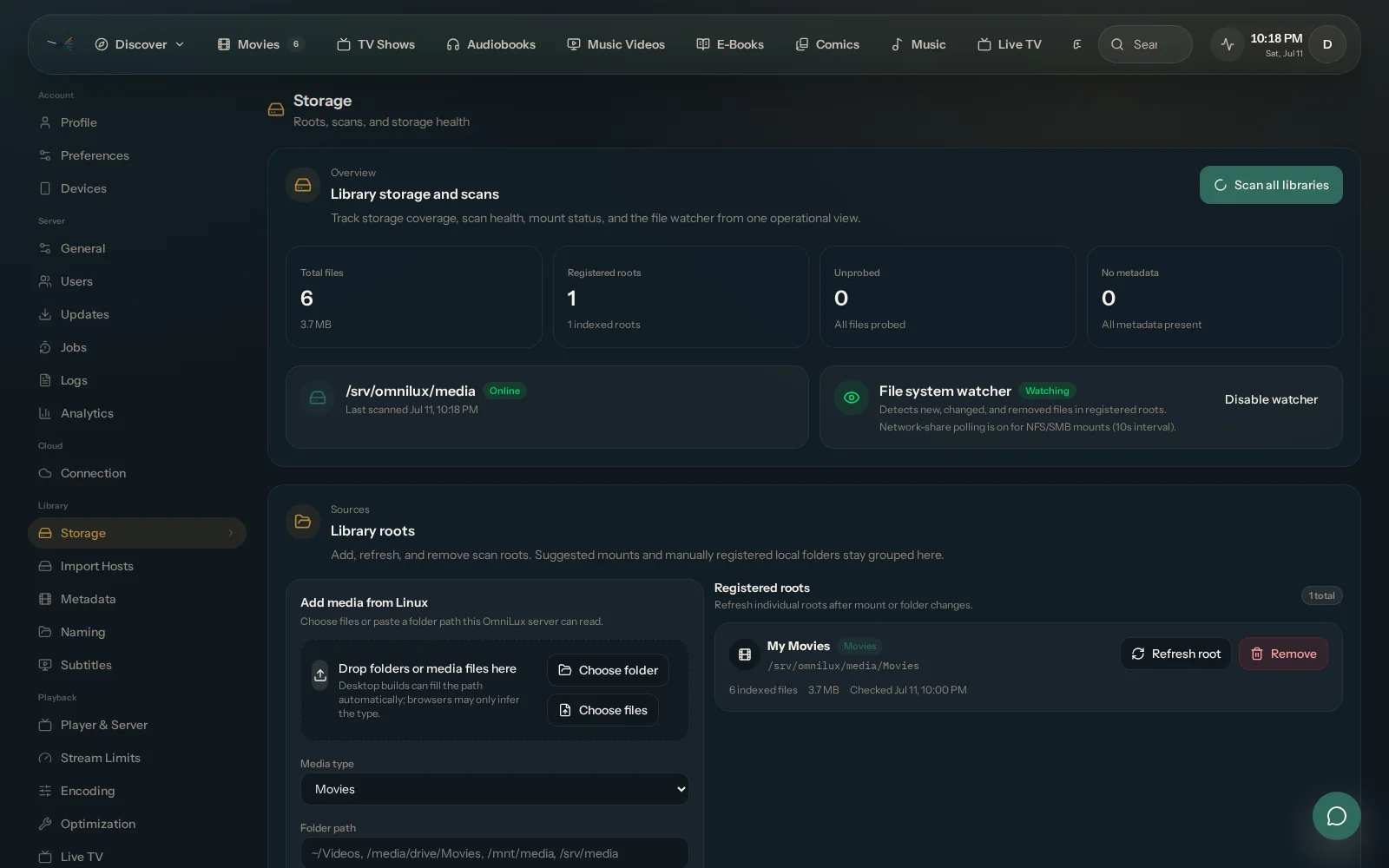
Remove a library root
Removing a root removes its catalog records from OmniLux. It does not delete the source files.
- Open Settings > Library.
- Choose the root you no longer want scanned.
- Remove it and confirm the catalog change.
Organize before you scan
Clear folder and file names give metadata matching the best chance of finding the correct title. A practical structure looks like this:
text
/data/
  movies/
    Movie Name (2024)/
      Movie Name (2024).mkv
  tv/
    Show Name/
      Season 01/
        Show Name - S01E01 - Episode Title.mkv
  music/
    Artist/
      Album (2024)/
        01 - Track Name.flac
Prepare or rename files before mounting the library. Keep the mounted source read-only once the beta begins.
Metadata enrichment
During a scan, OmniLux can parse file names, look for a matching title from the appropriate metadata provider, and save artwork and descriptive metadata in OmniLux-owned storage.
If a match is wrong, use the metadata controls available in the approved release to select a different result or correct the locally stored metadata. Those changes belong to OmniLux's database, not the source media file.
What OmniLux stores separately
Keep these writable paths outside the source library:
- OmniLux database and settings
- Metadata and artwork cache
- Plugin data when an approved release enables plugins
- Replaceable transcode workspace
This separation lets you rebuild application state or remove OmniLux without treating the media folders as application storage.
Planned
Any future file-organization workflow that intentionally changes source media will require a separate opt-in design, a preview of proposed changes, and explicit safety guidance. It is not part of the private beta.